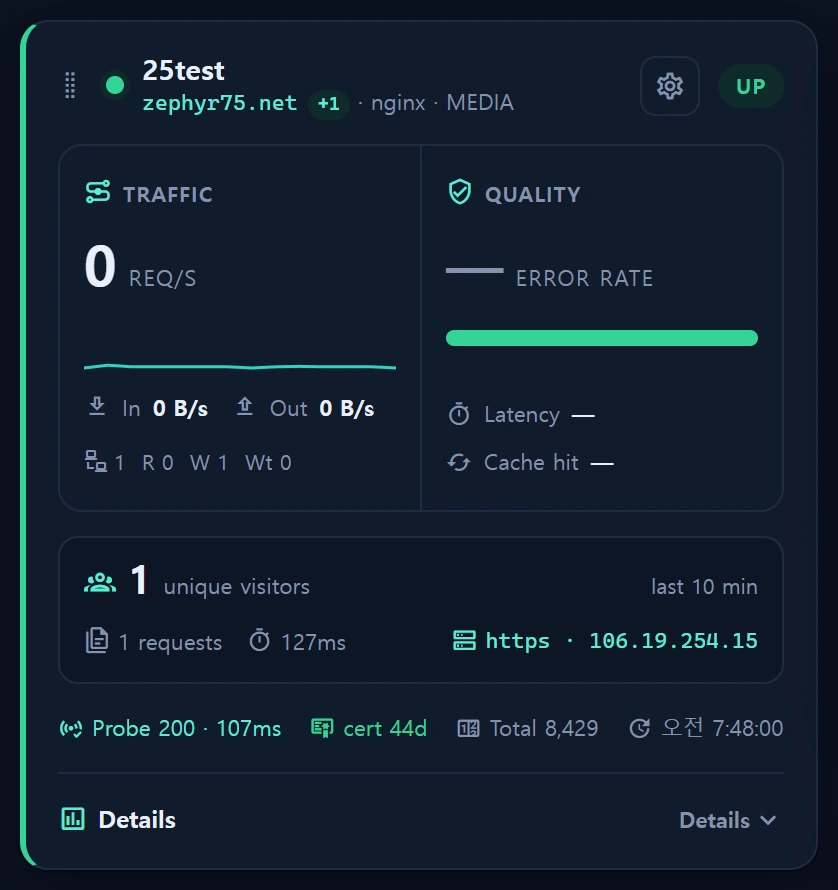
Overview — what it does
Two icons sit beside the unique visitors figure on each Service ▸ Web card, each opening a modal.
| Icon | Modal | Source |
|---|---|---|
| Person | Visitor analytics | Google Analytics 4 (Analytics Data API) |
| Magnifier | Search traffic | Google Search Console (Search Analytics API) |
Where the card's nginx_meta_ct access intel tells you what your server received, these two modals tell you where visitors came from and which search terms brought them — information your server logs simply do not contain.
What Site Kit does on WordPress is, at bottom, build the report requests for you. On Laravel you build them yourself and get identical numbers, so we use neither a plugin nor
google/apiclient— the whole job is "sign a JWT with the private key, exchange it for an access token", and the server signs it natively. A large dependency tree to reach two REST endpoints is a bad trade.
When to use it
- Traffic rose on a card and you want to know which channel and which source produced it.
- You want the search keywords driving impressions and clicks, and which page each keyword lands on.
- You want audience composition — new-visitor share, device mix, acquisition split — at a glance.
- You are tracking impressions, clicks and average position after publishing content.
Layout
Both modals split into Overview / Keywords / Traffic tabs (the Keywords tab exists only in the search modal), so you switch rather than scroll. The period selector offers 7 / 28 / 90 days — the same set the server whitelists.
Visitor analytics (GA4)
- Six KPIs: users, new users, sessions, page views, engagement rate, average session duration — each with its change against the immediately preceding period.
- Three composition strips: visitor loyalty (new/returning), device mix (desktop vs mobile & tablet), acquisition (search vs other). All three are two-way splits so they share one visual language, and since the KPIs already carry the absolute numbers these show proportion only.
- Trend chart: users, sessions and page views.
- Six panels (Traffic tab): channels, sources, cities, countries, devices, top pages.
Channel and source are not the same thing. The channel is the grouped answer (
Organic Search); the source is the concrete one (naver,github.com). For Korean sites especially, naver versus google is the difference between two entirely different acquisition stories.
Search traffic (Search Console)
- Five KPIs: clicks, impressions, CTR, average position, keyword count.
- Word cloud: size and colour encode impressions, a ● marks keywords that produced real clicks, and the figures are
~1d / ~7d / allimpressions. - Keyword table: clicks, impressions, CTR, position.
- Landing page × query: expand a page to see the keywords that entered through it.
- Three panels: landing pages, countries, devices.
Average position is impression-weighted. A plain mean lets one impression at rank 1 offset ten thousand at rank 40, which flatters the number badly.
How to set it up
1. Create a service account (Google Cloud)
- Google Cloud Console → pick or create a project → IAM & Admin ▸ Service Accounts → Create service account. No project-level role is required.
- Open the account → Keys → Add key ▸ Create new key ▸ JSON → download the file.
- Under APIs & Services ▸ Library, enable Google Analytics Data API and Google Search Console API.
2. Register it in InfraGuard
In Service ▸ Web ▸ Manage websites ▸ the site's edit tab, under Google integration:
| Field | Value | Where to find it |
|---|---|---|
| GA4 property ID | digits only (e.g. 550688232) |
GA4 Admin ▸ Property details, or the URL #/a<account>p<property>/ — the part after p |
| Search Console property | sc-domain:example.com or https://example.com/ |
exactly the string shown in the Search Console property picker |
| Service account JSON | paste the entire downloaded file | — |
The GA4 property ID is not the account ID. In
#/a405285491p550688232/, the part afterais the account and the part afterpis the property. Google deliberately does not distinguish "no such property" from "no permission" (the existence of a property is itself information), so a wrong number looks exactly like a permissions problem. Check the property ID first.
Never infer the Search Console property from the domain. Only the person who verified it knows whether it is a domain property (
sc-domain:) or a URL prefix (https://…/), and choosing wrong returns an empty result rather than an error.
3. Invite the service account to each property
The JSON is only an identity; access is granted per property. Copy the client_email shown after saving, then:
| Property | Where | Role |
|---|---|---|
| GA4 | Admin ▸ Property access management ▸ + |
Viewer |
| Search Console | Settings ▸ Users and permissions ▸ Add user | Full |
In GA4 this is Property access management, not Account access management (the left column is the account, the middle one the property). Search Console must be Full, not Restricted — the Search Analytics API rejects restricted users. Service accounts have no inbox, so clear the "notify by email" checkbox.
4. Test the connection
[Test connection] in the management modal queries both APIs once (last 7 days) with the stored credential and reports each part separately.
| State | Meaning |
|---|---|
ok |
Google answered. Zero rows is still ok — a new site and GSC's lag are not errors |
fail |
Google's own wording, plus the client_email to invite |
skip |
No property configured, so it was skipped (not a failure) |
With no credential at all it calls nothing (zero outbound requests). Unsaved edits are not tested — save first.
Correctness rules — why the numbers are built this way
These follow the traps Site Kit has already proven, every one of them evidence-based.
| Rule | Reason |
|---|---|
| The window ends yesterday | Today is partially aggregated, so including it makes the right edge always collapse |
GA4 reads totals[0] from metricAggregations:['TOTAL'] |
Summing rows that carry a limit under-reports the headline |
A hostName in-list filter on every GA4 request |
One property often spans several hosts, so without it the card shows the property's entire traffic. We pass every domain the service owns (primary, extras, www) to match the card's vts aggregation exactly |
Rankings use keepEmptyRows:false + notExpression{emptyFilter} |
GA4's (not set) routinely outranks real cities and sources |
Time series use keepEmptyRows:true |
A zero-traffic day must not vanish from the axis |
GSC uses dataState:'all' plus a ~2-day lag |
Without it the most recent days read as zero, which looks like traffic collapsing |
Domain properties are scoped with page contains |
sc-domain: spans every subdomain, so sibling sites' keywords leak in |
Data sources
| Target | Connection / location | Role |
|---|---|---|
infr_web_service.ga4_property_id · gsc_site_url |
default (000771) | per-site property mapping |
infr_web_service.google_cred_enc · google_cred_email |
default (000772) | per-site service account (Crypt, write-only) |
Analytics Data API properties/{id}:runReport |
external | visitor reports |
Search Console searchAnalytics/query |
external | search traffic reports |
Services: Services\Google\{GoogleTokenService, GoogleReportService, SiteInsightService}; endpoints Service\WebController@insight{Visitors,Search,Test}.
Caching: report responses are cached, and the cache key includes the acting identity (client_email). The same URL and body requested under a different account is a different authorisation, so sharing a key would hand one site another site's cached response.
Why credentials are per site
A single global .env key cannot work here. Registered sites belong to different owners and therefore different Google accounts, and one service account only reads the properties it was invited to — so the moment two customers' sites are registered, at least one always fails. Hence the paste-per-site field.
- Stored with
Crypt(APP_KEY) and write-only: the model hides the ciphertext, so the UI only ever sees a boolean plus the non-secretclient_email. The private key does not come back out. - Saving validates three ways: the JSON parses,
client_email/private_keyare present, and a signing-key check accepts the key. Truncated pastes are common, and letting one through surfaces later as a fake "permission denied" that sends you hunting through Google's IAM. - A server-wide credential survives as a fallback for single-account deployments; a site's own credential always wins.
The credential field is only transmitted when you touch it. The form never receives the private key back, so treating "absent" as "clear" would wipe the credential whenever someone edits only the note. Clearing it explicitly is the only removal.
Permissions
- Read: any logged-in user (
infr.auth, level ≥ 1). It only reads external statistics and changes nothing in InfraGuard or Google, so there is no step-up or audit entry (the same discipline as IP reputation lookup). - Saving credentials/properties:
user_level >= 2(same as saving a website), recorded ininfr_audit_log.
The target is addressed by registered site id only — a property ID cannot be passed as a parameter. If callers could name a property, our service-account permissions would become a way to read other people's GA4/Search Console properties (the same SSRF-avoidance discipline as Catalog live tests). The period is likewise whitelisted server-side to 7/28/90.
Troubleshooting · FAQ
- No icons on the card — a site needs both a credential and a property mapping before the buttons appear. The check is per site, so a site with its own credential works even when the global
.envis empty. Save, then reload. - Every check is green but it still reports 0 — that is a collection problem, not a query problem. ① The window ends yesterday, so a tag installed today is still outside it. ② Confirm the measurement ID (
G-…) actually served by the site belongs to the property you are querying (GA4 Admin ▸ Data streams); if data is landing in a different property you will read zero forever. ③ Search Console lags ~2 days, and a new site may have no impressions at all yet. User does not have sufficient permissions— either step 3 (inviting the account) is missing or the GA4 property ID is wrong. Both produce identical wording, so check the property ID first.- Only Search Console comes back empty — the property string most likely does not match reality (
sc-domain:versushttps://…/). It fails as an empty result rather than an error, so compare it against the property picker. - The credential disappeared after saving — saving with the field emptied is an explicit removal. Leaving it untouched preserves it.
- The modal shows a
Samplebadge — no data has been collected yet, so an illustrative sample is shown for layout purposes. It switches to real data automatically once data arrives.
Related
- Service ▸ Web — the web monitoring screen itself (cards, uptime, certificates)
- Public landing & visitor analytics — the collection side (gtag/GTM, Search Console verification)
- IP reputation lookup — the same read-only external-lookup permission model