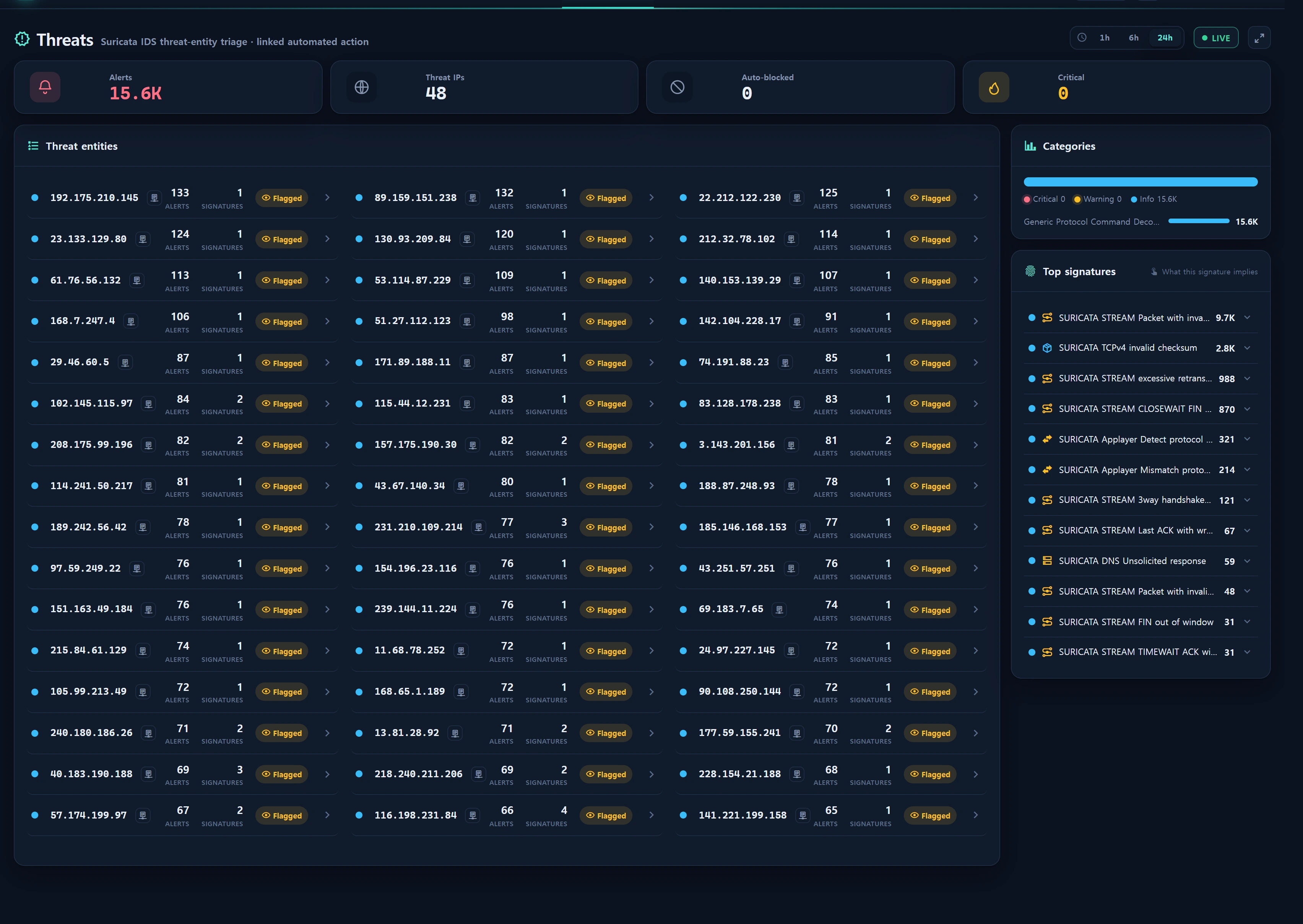
Overview — what it does
IP Reputation Lookup is a shared capability: click a suspicious source IP (src_ip) anywhere in the Security area and the server queries AbuseIPDB threat intel on your behalf, rendering the result in an in-app popup. You never leave the console — you judge "how notorious is this IP" right where you are triaging.
Key characteristics:
- Pure lookup (read-only). This feature only calls AbuseIPDB
/api/v2/check. It does not report or publish the IP externally — outbound reporting (international cooperation) is a separate, deferred response phase. - Abuse Confidence Score 0–100 gauge plus report count, distinct reporters, usage type, ISP, country, domain, Tor/whitelist flags, and recent report history — all normalized.
- Multi-key round-robin. The AbuseIPDB key pool registered in Reputation API is consumed in order; on a 429 (quota exceeded) or 401/403 (key problem) the service automatically fails over to the next key (quota pooling).
- Per-IP 1-hour cache. To protect the free tier's 1000 requests/day quota, repeated lookups of the same IP within an hour return the cached result.
- Shared mixin. Threats, Detections, Security Overview, and Blocklist all reuse the same popup component.
This article's live button opens the Security area (
/security). Reputation Lookup is not a standalone page — it is a shared popup that appears when you click the shield-search symbol (.infr-ipsym) next to an IP or a [Check reputation] button on a Security screen.
When to use
- Triaging top-severity attacker IPs in Threats — is it truly malicious, or a known scanner/botnet?
- Justifying whether an JA3 offender or Kitsune anomaly IP in Detections is a real threat.
- Cross-checking a target's external reputation before you block/release in Blocklist & Reputation.
- Quickly scanning IP reputation from the top-threat-IP / JA3 offender panels of the Security Overview.
Layout
The popup (security/partials/abuse-modal.blade.php) renders in one of three states depending on the lookup result.
Success — reputation card
| Region | Content |
|---|---|
| Confidence gauge | 0–100 conic donut + centered score%. The tone color shifts with the score (see verdict table). |
| Verdict label | No reports / Low risk / Elevated / High risk |
| Flags | Tor node (is_tor) · Whitelisted (is_whitelisted) badges |
| Two big stats | Total reports · distinct reporters |
| Meta | Country · usage type · ISP · domain · last reported time |
| Recent reports | Up to 6 — category chips + reporter country + time + comment (max 200 chars) |
| Checked stamp | The time the server performed the lookup (checked_at) |
Confidence score → verdict tone
| Score | Verdict | Tone | Meaning |
|---|---|---|---|
| 0 | No reports (clean) | good | No abuse reports in this window |
| 1–24 | Low risk (low) | info | A few reports — informational |
| 25–74 | Elevated (elevated) | warn | Meaningful abuse history |
| 75–100 | High risk (high) | crit | Strong malicious signal |
Not-configured / failure states
- No key configured: key-alert icon + notice. Use the footer [Open AbuseIPDB] button to check the external site directly.
- Lookup failed: quota exceeded, network error, etc. Retry shortly or fall back to the external link.
Footer action buttons
| Button | Action |
|---|---|
| Copy IP | Copy the IP to clipboard (execCommand fallback in insecure contexts) |
| IP lookup | Jump to IP Connections (/infra/traffic/ips?src_ip=…) |
| Open AbuseIPDB | External abuseipdb.com/check/{ip} in a new tab |
| Block | Deep-link prefill into Blocklist (/security/blocklist?add={ip}) |
How to use
- On a Security screen (Threats, Detections, Overview, Blocklist), click the shield-search symbol or [Check reputation] button next to an IP.
- The popup opens with a loading spinner and the frontend requests the lookup from the server:
GET /security/ip-reputation?ip=203.0.113.10
- The server strictly validates the IP (
filter_var FILTER_VALIDATE_IP), then queries via AbuseIpdbService and returns normalized JSON. - Review the gauge, stats, and recent reports. Use the footer buttons to copy, trace, or block as needed.
Response schema (normalized)
On success the server returns JSON consumed by the popup:
{
  "ok": true,
  "configured": true,
  "ip": "203.0.113.10",
  "score": 84,
  "reports": 128,
  "distinct_users": 41,
  "country": "CN",
  "usage": "Data Center/Web Hosting/Transit",
  "isp": "Example Hosting Ltd",
  "domain": "example-host.net",
  "is_tor": false,
  "is_whitelisted": false,
  "last_reported": "2026-08-12T22:14:07+00:00",
  "recent": [
    { "at": "2026-08-12T22:14:07+00:00", "country": "US", "categories": [18, 22], "comment": "SSH brute-force" }
  ],
  "checked_at": "2026-08-13 09:31:20",
  "external_url": "https://www.abuseipdb.com/check/203.0.113.10"
}
On graceful failure:
{ "ok": false, "configured": false, "external_url": "https://www.abuseipdb.com/check/203.0.113.10" }
| Field | Source (AbuseIPDB) | Meaning |
|---|---|---|
score |
abuseConfidenceScore | Abuse confidence 0–100 |
reports |
totalReports | Total reports |
distinct_users |
numDistinctUsers | Number of distinct reporters |
country |
countryCode | Country code |
usage |
usageType | Usage (data center / ISP / …) |
isp / domain |
isp / domain | ISP · domain |
is_tor |
isTor | Tor exit node flag |
is_whitelisted |
isWhitelisted | AbuseIPDB whitelist |
last_reported |
lastReportedAt | Last reported time |
recent[] |
reports[] | Recent reports (max 6, comment cut at 200 chars) |
Report categories (1–23)
recent[].categories is an array of numeric IDs. The popup renders labels via the security.abuse.cat lang map.
| ID | Label | ID | Label | ID | Label |
|---|---|---|---|---|---|
| 1 | DNS Compromise | 9 | Open Proxy | 17 | Spoofing |
| 2 | DNS Poisoning | 10 | Web Spam | 18 | Brute-Force |
| 3 | Fraud Orders | 11 | Email Spam | 19 | Bad Web Bot |
| 4 | DDoS Attack | 12 | Blog Spam | 20 | Exploited Host |
| 5 | FTP Brute-Force | 13 | VPN IP | 21 | Web App Attack |
| 6 | Ping of Death | 14 | Port Scan | 22 | SSH |
| 7 | Phishing | 15 | Hacking | 23 | IoT Targeted |
| 8 | Fraud VoIP | 16 | SQL Injection |
Data sources
This feature creates no new table. It works purely with an external API call + a key registry + a cache.
| Component | Description |
|---|---|
| AbuseIPDB API | https://api.abuseipdb.com/api/v2/check (verbose=1, maxAgeInDays=provider value·default 90). 8-second timeout. |
AbuseIpdbService |
Lookup, normalize, cache, and consume rotated keys. check($ip) (cached) · checkWithKey() (admin single-key test, uncached). |
ReputationProviderService |
Key-pool SOT. Serves active infr_reputation_provider rows ordered by priority·id with a 30s cache, rotated() for round-robin, falling back to .env ABUSEIPDB_KEY if none registered. |
infr_reputation_provider |
Multi-key AbuseIPDB registry table (migration 000733). Keys are stored as secret_enc (Crypt, write-only) — never returned to the browser. Managed in Reputation API. |
| Cache | Cache key infr:sec:abuse:{ip}, TTL 3600s (1 hour). Round-robin counter is infr:reputation:rr. |
config/services.php |
abuseipdb.key (=.env ABUSEIPDB_KEY) · abuseipdb.max_age_days (default 90). Fallback only when no registered key exists. |
Key rotation / failover flow
check(ip)
  ├ cache hit? → return
  └ miss → iterate providers.rotated()
        key#1 → 200? → normalize·cache·return
              → 429/401/403 → fail over to next key (secret never printed)
        key#2 → …
        all fail → { ok:false, error:"http_429"|"unreachable" }
Register several free-tier keys and their quotas pool together. When one key exhausts its daily quota and returns 429, the service automatically advances to the next — teams with heavy investigation load should register 2–3 keys in Reputation API.
Access
- Lookup endpoint
GET /security/ip-reputation: because it is a pure lookup, there is no step-up re-confirmation and no audit log. It sits behind the Security menu area (min_req 2), so security staff (staff=5) and above effectively reach it. It publishes nothing externally, so it is not a destructive action. - Invalid IP:
filter_varvalidation failure returns HTTP 422{"ok":false,"message":"invalid_ip"}. - Key management Reputation API: CRUD, live test, and priority drag over
infr_reputation_providerare admin-only (admin=10, level≥5) + audited. Keys are stored encrypted and can only be replaced/cleared during edit. - No secret leakage: API keys never leak into responses or error bodies (errors are recorded only as an
http_STATUSstring).
Troubleshooting & FAQ
The popup says "API key not configured"
No infr_reputation_provider key is registered and .env ABUSEIPDB_KEY is empty. Add an AbuseIPDB key in Reputation API or set ABUSEIPDB_KEY=YOUR_KEY in .env. In the meantime, use the [Open AbuseIPDB] button to check the external site.
"Lookup failed" keeps appearing
- 429 (quota exceeded): you may have burned the free tier's 1000/day. Register additional keys to pool quota, or retry the next day.
- 401/403 (key problem): the key is expired, mistyped, or inactive. Verify it with [Test] in Reputation API.
- Network (unreachable): confirm outbound to
api.abuseipdb.com(443) is not blocked from the console host.
An IP I just blocked still shows a low score
Results are cached per IP for 1 hour (infr:sec:abuse:{ip}). If you need a fresh value, re-query after up to an hour. The cache exists to protect your free quota.
Can I report the IP to AbuseIPDB from here?
No. This feature is lookup-only. Report submission (international cooperation) is a separate, deferred response phase — nothing is published externally here.
I only see 6 recent reports
The normalization step keeps only the latest 6 (MAX_REPORTS=6). See the full history via [Open AbuseIPDB] on the external site.
It's a whitelisted/internal IP but the lookup button is hidden
Security screens tag registered instance IPs (your own network) with an Internal badge and hide the reputation button (SecurityScope) — this prevents confusion when Suricata's directional labels mark our own server as the "source." Internal-network definitions are managed in Operations Policy.
Related
- Reputation API management — multi-key AbuseIPDB registry, round-robin, live test
- Threats — check IP reputation while triaging IDS threat entities
- Detections · JA3 — verify JA3 offender / anomaly IP reputation
- Blocklist & Reputation — blocklist + reputation cross-check + block deep-link
- Security Overview — defense funnel and top threat IPs
- Whitelist — block exemption and srct auto-innocent whitelisting