Overview — what it does
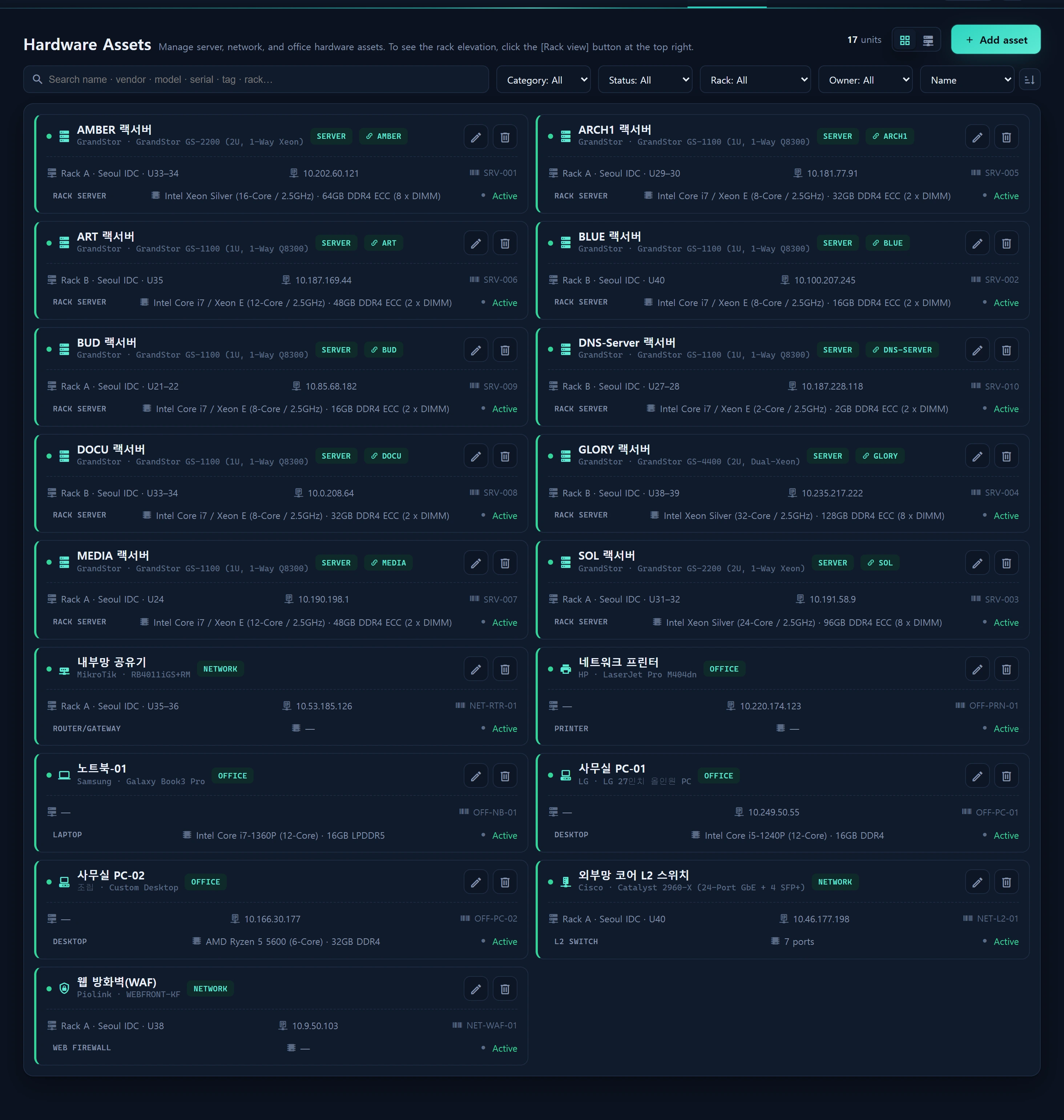
Assets ▸ Hardware is the CMDB for physical hardware assets (infr_hardware). It covers servers (component detail), network gear (port mapping · topology) and office devices, and visualizes them as a rack elevation. Physical servers link 1:1 to their OS instance via instance_id.
Layout
A card grid + a rack-view toggle. Click [Rack view] (the card/rack toggle at the top-right of the header) to switch to a U-unit rack elevation (drag to move, resize, edit).
| category | Examples | Special fields |
|---|---|---|
| server | rack server | specs (cpu/memory/motherboard/raid/psu/nic/chassis/disk) · instance_id |
| network | L2/L4 switch · router · web firewall · AP · LB | ports[] port mapping · net_map (Konva topology) |
| office | desktop · laptop · printer · monitor | — |
How to use
Modal CRUD (inherits the Instances pattern). Rack awareness: rack + rack_unit_start (U) + rack_units. Network gear draws topology through port mapping and a Konva network map.
Data sources
infr_hardware(specs/ports/net_map json · rack fields)- Currency comes from Operations Policy
currency
Access
Read level≥1; write level≥2. Open-port exposure is Security ▸ Firewall — here it is the asset registry only (components, rack, topology).
Related
- Instances CMDB — physical HW ↔ logical OS link
- Storage & Files