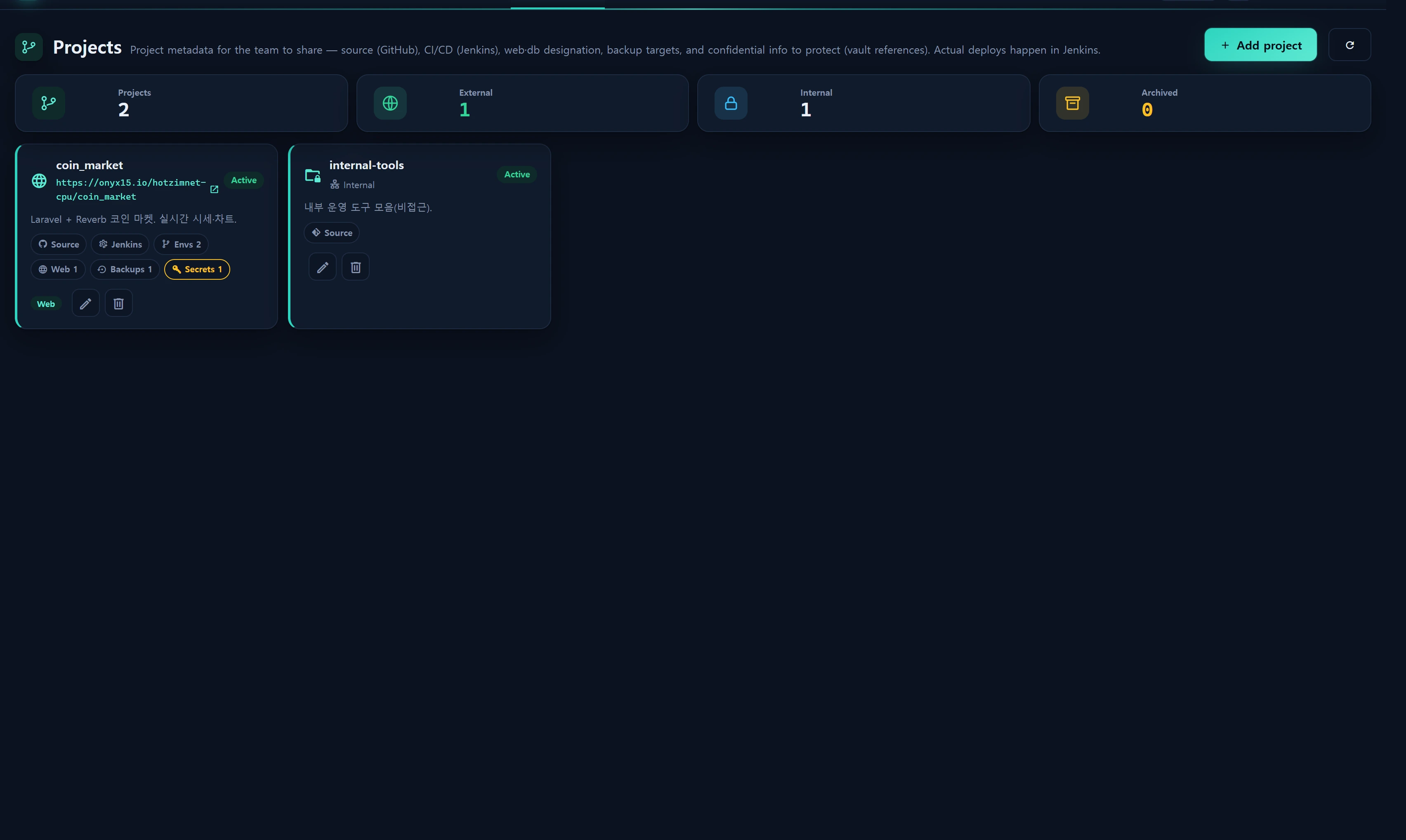
Overview — what it does
Projects is a registry that gathers the metadata of every project your team runs into one shared place. For each project you register its source repository (GitHub, etc.), its CI/CD pipeline (Jenkins), the web services and databases it uses, its backup targets, and — crucially — where its secrets live. Anyone on the team can then answer at a glance: "what is this project made of, where does it deploy, and which secret is where?"
This screen is not a deployment tool. Actual builds and deploys happen in Jenkins. InfraGuard does not trigger any pipeline from here; the registered data is shared documentation. The URLs, Job names, and branches you store are reference links and labels only — nothing is executed.
Core design principles:
- Secret values are never stored inline. The actual values of passwords, tokens, and keys are not kept here. Instead you either (1) reference a key held in the Inventory vault (
infr_vault_key), or (2) record only "which secret lives where" in a masked checklist. - Everything is edited in one tabbed modal (Overview · Source · CI/CD · Links · Backup · Secrets).
- Create/update/delete and vault-value reveals are all written to the audit log (
infr_audit_log).
When to use
- Onboarding a teammate who needs to quickly learn "what is this project's repo, deploy URL, and DB?"
- Laying out each project's web/db dependencies so you can instantly gauge blast radius during an incident.
- Documenting a map of the secrets a project depends on (which key is where, which vault entry belongs to this project).
- Recording backup targets and cadence as project metadata, tied to your backup policy.
Layout
KPI strip
| Cell | Meaning |
|---|---|
| Projects | Total registered projects |
| Accessible | Projects with accessible=1 (an external URL) |
| Internal | Projects with accessible=0 (internal-only, not exposed) |
| Archived | Projects with status=archived |
Project cards
Each card shows:
- Icon + name — externally accessible projects use
mdi-web; internal-only usemdi-folder-lock-outline. - URL link — if
accessibleand a URL exists, an open-in-new-tab link; otherwise aninternalbadge. - Status badge — active / paused / archived.
- One-line summary.
- Composition chips — only the registered elements appear: Source · Jenkins · Envs N · Web N · DB N · Backups N · Secrets N.
- Group label (category) + edit/delete buttons (when you have write access).
Edit modal (6 tabs)
A wide modal (.infr-modal__panel--wide) that splits input by tab.
| Tab | Inputs |
|---|---|
| Overview | Name (required) · Key (slug) · Status · Group · Accessible toggle · URL · Summary · Tags |
| Source | Repo provider (GitHub/GitLab/Gitea/Bitbucket/Other) · Repo URL · Default branch · Visibility (public/private/internal) |
| CI/CD | Jenkins URL + environments repeater (per dev/staging/prod: deploy URL · branch · Jenkins Job · note) |
| Links | Web service checkboxes (registered infr_web_service) + DB (collector) checkboxes (access=database collectors) |
| Backup | Backup-target repeater (kind · target · schedule · note) |
| Secrets | Vault key references (check + reveal value) + secret checklist repeater (label · location · ref · note) |
How to use
Register a project
- Click [Add project] at the top right (write access required).
- On the Overview tab enter the name (required). The key (slug) is optional and must match
^[a-z0-9_-]+$(e.g.coin-market). - If the service is externally reachable, turn on the Accessible toggle and enter its URL. For internal-only, leave it off and the URL field is disabled.
- Fill the remaining tabs (Source, CI/CD, Links, Backup, Secrets) as needed — all are optional.
- [Save] — the server validates, upserts into
infr_project, and refreshes the card.
Register CI/CD environments
On the CI/CD tab enter the Jenkins URL, then use [Add environment] to add deploy targets row by row:
{
  "env": "prod",
  "url": "https://coin.example.com",
  "branch": "main",
  "jenkins_job": "coin_market-deploy-prod",
  "note": "blue/green"
}
envonly accepts the whitelistdev/staging/prod(any other value is forced todevby the server).- Each string field is clamped by length (URL 255 · branch 120 · Job 191 · note 255).
- Up to 20 environments.
Link web/db
On the Links tab, check the resources this project uses.
- Web services — pick from the
infr_web_servicelist (name · domain) registered in Service ▸ Web. Stored as an array of web_service ids. - DB (collector) — the key array of collectors registered with access=database (Admin ▸ Collectors / Service ▸ Database).
Each links up to 50 entries.
Declare backup targets
Use the Backup tab repeater to document this project's backup policy (kind · target · schedule · note). This is reference metadata and is not executed — actual backup jobs are managed on the Backup Schedule Board.
Manage confidential info (the key feature)
Secrets use two mechanisms together. Neither stores the real secret value in infr_project.
1) Vault key references (vault_key_ids)
- On the Secrets tab, check keys from the Inventory vault (Assets ▸ Inventory ▸ Keys,
infr_vault_key) to link them. - The list is delivered masked (id · category · title · username only — no value).
- Pressing [Reveal value] on a linked key calls
POST /service/projects/vault-reveal, which decrypts the value only at that moment and returns it.
Vault-value reveals are audited. Every reveal writes
vault_key.reveal(target=vault_key, via=project) toinfr_audit_log. The value shows briefly and copies to the clipboard on click — reveal only when you need it. The stored project record holds only the key id reference.
2) Secret checklist (secrets, masked)
For secrets not in the vault (or held externally), record only the location. The value is never stored.
| Field | Example |
|---|---|
label |
STRIPE_SECRET_KEY |
location |
.env (prod server /var/www) |
ref |
1Password › Coin › prod |
note |
rotate quarterly |
The server's cleanList() keeps only the allowed keys (label/location/ref/note) and clamps each to 255 chars. If all four fields are empty the row is dropped.
Delete
Remove from the bottom-left of the edit modal or the card's [Delete]. After confirmation, POST /service/projects/delete deletes the infr_project row and records project.delete.
Data sources
| Data | Source |
|---|---|
| Project records | infr_project (migration 000715) |
| Groups (categories) | infr_asset_group (via group_id) |
| Web service options | infr_web_service (name · domain) |
| DB (collector) options | infr_collector where access=database (key · title · host_alias) |
| Vault key options | infr_vault_key — masked (id · category · title · username, no value) |
| Vault value reveal | infr_vault_key.revealSecret() (decryption, only on reveal) |
| Audit log | infr_audit_log (project.create/update/delete, vault_key.reveal) |
Storage schema (infr_project, excerpt)
key            varchar(60) unique nullable   # slug
group_id       int -> infr_asset_group
name           varchar(160)                  # required
status         enum(active,paused,archived)
accessible     boolean default 1
url            varchar(255)                  # exposed when accessible=1
summary        text
repo_provider  enum(github,gitlab,gitea,bitbucket,other)
repo_url / default_branch / visibility(public,private,internal)
jenkins_url    varchar(255)
environments   json  [{env,url,branch,jenkins_job,note}]
web_refs       json  -> infr_web_service id array
db_refs        json  -> infr_collector(database) key array
backup_targets json  [{kind,target,schedule,note}]
vault_key_ids  json  -> infr_vault_key id array (values stay in the vault)
secrets        json  [{label,location,ref,note}]  # checklist, no values stored
tags / meta    json
This screen does not live-poll. It reloads the list only on save, delete, or the refresh button (
GET /service/projects/list). Real-time status is handled by Service ▸ Catalog and Service ▸ Web.
Access
| Action | Route | Min level |
|---|---|---|
| Read (index/list) | GET /service/projects, /list |
1 (demo, infr.auth) |
| Reveal vault value | POST /service/projects/vault-reveal |
1 (+ audit) |
| Save (create/update) | POST /service/projects/save |
2 (staff) |
| Delete | POST /service/projects/delete |
2 (staff) |
- The write gate checks session
infr_user_level >= 2(canWrite()). Failure returns403+project.err.forbidden. - On save,
vault_key_idsis filtered to only real vault key ids (InfrVaultKey::whereIn(...)existence check). Forged ids are silently dropped. - Levels are demo=1 · staff=5 · admin=10; some areas are gated separately by the
infr.level:Nmiddleware.
Troubleshooting & FAQ
Q. I press Save but get a 403. Writing requires level 2 or higher. A viewer (level 1) account can only read and reveal vault values. Ask an administrator to raise your level.
Q. [Reveal value] comes back empty.
Either that vault entry holds no secret (hasSecret=false) or decryption failed (e.g. APP_KEY changed). Re-set the value under Inventory ▸ Keys. revealSecret() returns null on failure.
Q. Nothing appears in the Web/DB link lists. Web services must first exist in Service ▸ Web, and DB options require access=database collectors. Register them, then reopen the project modal and the options will populate.
Q. Saving the key (slug) throws a format error.
The key allows only lowercase letters, digits, hyphens, and underscores (^[a-z0-9_-]+$, max 60). Strip spaces, uppercase, and other symbols. The key is optional, so you may leave it blank.
Q. Can I trigger a deploy here? No. Deploys run in Jenkins. This screen keeps the Jenkins URL and Job names as documentation only.
Q. Can I just type the secret value into a secrets note?
Never. secrets is a location map that stores no values. Put the real value in the encrypted Inventory ▸ Keys vault and reference it via vault_key_ids.
Related
- Service ▸ Web — the web services linked via
web_refs. - Service ▸ Database — the DB collectors linked via
db_refs. - Service ▸ Catalog — per-instance daemon liveness (live status lives here).
- Backup Schedule Board — defining and running actual backup jobs.
- Assets ▸ Inventory — the source screen for vault keys (
infr_vault_key). - Audit log — verify project.create/update/delete and vault_key.reveal records.