Overview — what it does
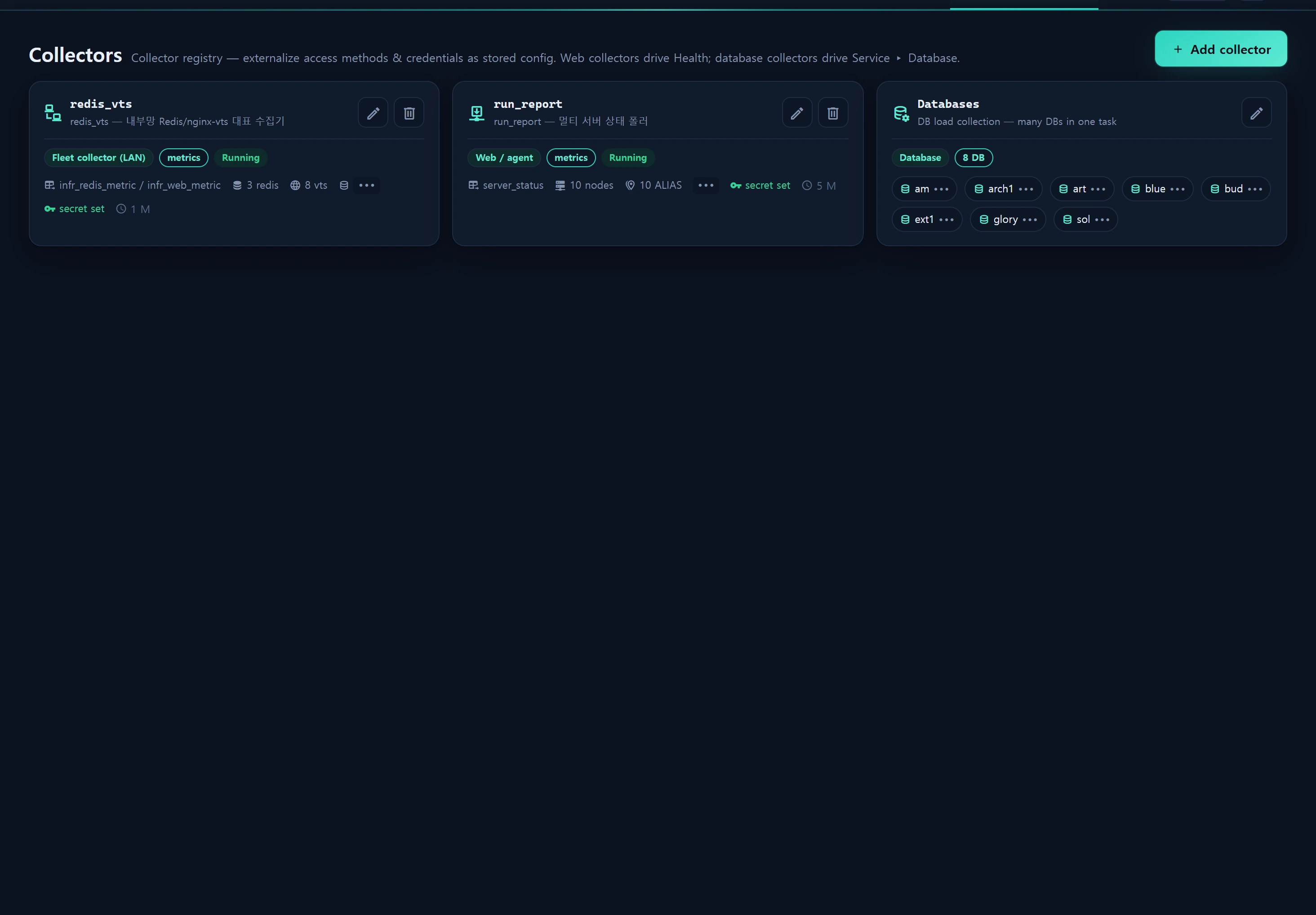
Administration ▸ Collectors is InfraGuard's collector registry (the infr_collector table). It lifts hardcoded credentials and host maps out of code and stores them as data. Collectors are abstracted by access method (access).
| access | Purpose | Drives |
|---|---|---|
web |
Remote agent endpoint (tlx probe · run_report) | Infra ▸ Health |
database |
Direct connection to a registered DB to collect load metrics | Service ▸ Database · Infra ▸ Alerts |
agent |
Internal-network representative collector (Redis + nginx‑vts) | Service ▸ Sessions · Service ▸ Web |
This article covers the access=database collector. The InfraGuard app periodically connects to a registered DB and reads SHOW GLOBAL STATUS · information_schema.processlist · information_schema.tables, writing a time series to infr_db_metric. It never reads or writes your data rows — only load and structure metrics.
DB collectors are the source for the DB load monitoring screen and Alerts. Register one DB here and it appears on both automatically.
When to use
- You want to monitor connection saturation, throughput, slow queries, and schema size of live MySQL / MariaDB instances from a single console.
- You are onboarding a new DB server into monitoring.
- You want to reuse DB credentials already present in
.envwithout re-entering the secret (cred_ref=env:PREFIX). - You manage several DBs at once (shared defaults + item array) — use the grouped editor.
Layout
The collector list renders cards grouped by access method. access=database rows are folded into one "Database" group card (to avoid card sprawl). The group card's [Edit] opens the grouped editor (2 tabs).
Grouped editor tabs
| Tab | Contents |
|---|---|
| Basic (shared connection defaults) | driver · port · database · username · waiting threshold (slow_time) · schedule · cred_ref — applied to every DB item |
| Databases (item array) | Per-item alias · display title · host/IP · driver (override) · run toggle · password (write-only) |
Although the UI shows a single group card, saving upserts each item as its own
db@{alias}row (access=database). The collection pipeline, Service ▸ Database, and alert targeting all operate per collector. Removing an item deletes itsdb@row.
Per-collector fields (infr_collector)
| Column | Meaning |
|---|---|
key |
Unique key. DB items are db@{alias} (e.g. db@blue) — immutable (alerts target by key) |
title |
Display name (defaults to {alias} DB) |
access |
Fixed database |
kind |
Fixed metrics |
host_alias |
The item's alias (host label) |
feeds_table |
Fixed infr_db_metric |
cred_ref |
Credential reference (e.g. env:STATS_DB) — empty falls back to config + secret_enc |
config |
{driver, host, port, database, username, sample:{slow_time_sec, connect_timeout}} (no secret) |
secret_enc |
DB password (Crypt · write‑only · never returned to browser) |
is_run |
Whether the schedule is active |
How to use
1. Register a new DB (grouped editor)
- Go to Administration ▸ Collectors.
- On the "Database" group card, click [Edit] → Basic tab and fill shared values.
driver:mysqlormariadbport: default3306database: just the default connection schema — leave empty to connect toinformation_schema(the collection scope is decided by the account's grants)username: the monitoring account (e.g.infra_ro)- waiting threshold (
slow_time): count queries running longer than this many seconds as "waiting/backed up" (1–60 s, default 2) cred_ref:env:PREFIXto reuse.envcredentials
- Databases tab → [Add DB] → per item:
alias(required) ·host/IP · optional password. - [Save]. Each item is created/updated as a
db@{alias}row.
2. Handling the secret — two paths
(A) Enter the password directly — typed into the password field, it is stored to secret_enc via encryption. The list and API responses never expose the plaintext; only has_secret/has_db_pw booleans are returned.
The password is write‑only. On edit, leaving the password field blank preserves the existing value (no overwrite). To remove it explicitly, use the clear option.
(B) Reuse .env credentials (cred_ref=env:PREFIX) — do not store the password in the DB; reference a credential set already in .env. DbCollectorService::resolveConn() reads these keys:
Values filled into config take precedence; empty ones are filled from PREFIX_* env (host/port/database/username/password).
3. Server-wide waiting queries — the PROCESS grant
The two core metrics (connection saturation = Threads_running/Threads_connected/max_connections, and QPS · slow rate = ΔQuestions/ΔSlow_queries) are collectible with a plain (USAGE) account. However, server-wide waiting-query aggregation and whole-schema size analysis require extra grants.
- Without
PROCESS→ only your own connection's processlist is visible (waiting_scope=0). - With
PROCESS→ all sessions are aggregated (waiting_scope=1, server-wide).
A least-privilege account script to run once as root on each target DB host: sql/infr_db_monitor_grant.sql.
-- Dedicated read-only account (narrow the source host to the InfraGuard app server IP)
CREATE USER 'infra_ro'@'%' IDENTIFIED BY 'CHANGE_ME_TO_A_STRONG_SECRET';

-- Global observation grants (NOT data access)
GRANT PROCESS, REPLICATION CLIENT ON *.* TO 'infra_ro'@'%';

-- Schema size analysis (all DBs · read-only). For one DB only, narrow to design.*
GRANT SELECT ON *.* TO 'infra_ro'@'%';

-- Blast-radius isolation — prevent connection monopolization (lesson from the 2026-08-06 [1040] incident)
ALTER USER 'infra_ro'@'%' WITH MAX_USER_CONNECTIONS 5;
FLUSH PRIVILEGES;
MariaDB 10.5+ can use
BINLOG MONITORinstead ofREPLICATION CLIENT.PROCESSandSELECTare identical.
4. Run and verify collection
Collection is performed by the infr:collect-db artisan command. The dev launcher (composer dev) scheduler pane calls it every minute.
# Sample one collector once immediately (bypass the ops-policy gate)
php artisan infr:collect-db --key=db@blue --force

# Collect all registered DBs (is_run=1) subject to policy
php artisan infr:collect-db
Collection gating is decided by Operations Policy.
| Policy key | Default | Meaning |
|---|---|---|
db_collect_mode |
economy |
economy = collect only when a console user (presence) is active · always = always |
db_collect_interval_sec |
60 |
Collection interval (seconds, minimum 10) |
presence_window_sec |
— | Window keeping "user present" after last activity |
Use
--keyto test a specific database collector. The [Test] / [Sync code] buttons are foraccess=webcollectors only and do not apply to database collectors — verify with the command above.
5. Status thresholds
DbCollectorService::statusOf() judges up/degraded against thresholds from Operations Policy.
| Threshold key | Default | When exceeded |
|---|---|---|
db_degrade_conn_pct |
80 |
connection saturation (%) ≥ → degraded |
db_degrade_running |
40 |
threads_running ≥ → degraded |
db_degrade_waiting |
5 |
waiting query count ≥ → degraded |
db_degrade_slow_qps |
1 |
slow rate (/s) ≥ → degraded |
Data sources
| Target | Table / source | Notes |
|---|---|---|
| Collector registry | infr_collector (migrations 000201 + 000680) |
access · config (JSON) · secret_enc (Crypt) |
| Collected time series | infr_db_metric (migration 000681) |
derived from SHOW GLOBAL STATUS · qps/slow_qps deltas |
| Remote DB status | SHOW GLOBAL STATUS · SHOW VARIABLES max_connections |
direct connection to each registered DB |
| Waiting queries | information_schema.processlist |
server-wide with PROCESS grant |
| Schema size | information_schema.tables |
30-minute long cache (slow-query bypass) |
No connection leaks.
DbCollectorService::withConn()creates a runtime connection per sample and closes it immediately infinallyviaDB::purge. A PDO timeout (default 5 s) keeps web requests/schedules from blocking on remote latency. Never spawn an infinite-loop daemon from the scheduler — it exhausts the shared MySQL connection pool (the 2026‑08‑06[1040] Too many connectionsincident).
Access
- Screen access and all CRUD: admin (level ≥ 10) —
CollectorController::isAdmin()checks sessioninfr_user_level >= 10(demo=1 and staff=5 cannot enter). - On failure, 403. Save, delete, and
fillare all audit-logged toinfr_audit_log/logs. fill/{key}(injecting config into an Inventory ▸ Tools mashup) is a secret-injection exception (documented §Option B) — admin only + audited.
See RBAC levels for the full scheme.
Troubleshooting & FAQ
- Waiting queries only show my own connection — no
PROCESSgrant, sowaiting_scope=0. Grant it viasql/infr_db_monitor_grant.sql. - Schema size shows only some DBs — you need a global
SELECTgrant (orSELECTon the specific DB). - Changed the password but it didn't take — an empty password field preserves the existing value on edit. Enter a new value to replace it.
- Card briefly shows down (red) in economy mode — collection lagged because no console user is present. Entering the screen triggers an on-demand sample (ensureFresh), or switch to
alwaysmode (see Service ▸ Database false-red avoidance). - I want to change the key — the
db@{alias}key is immutable on edit (for alert-targeting stability). Add an item with a new alias to mint a new key. - I'm level 5 but access is denied — some copy reads "level 5+", but the actual gate is admin (level ≥ 10).
Related
- Service ▸ Database — the DB load/structure monitoring screen
- DB tuning education — lock/cache/index concepts
- Infra ▸ Alerts — DB-condition alerts (waiting queue · slow queries)
- Operations Policy — collection mode, interval, status thresholds
- RBAC levels — the admin level gate
- Audit log — collector change history