Overview — what it does
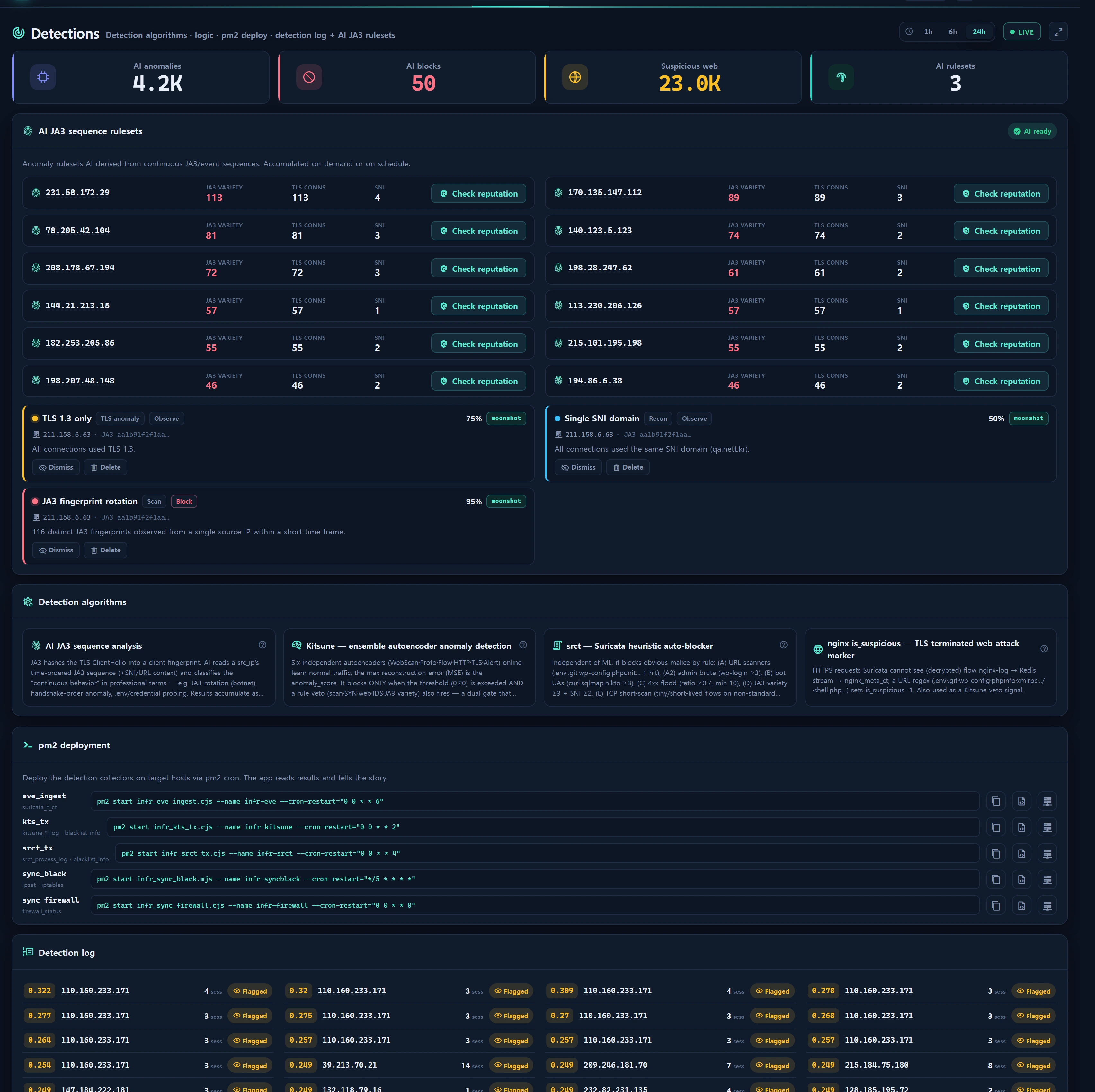
Security ▸ Detections (/security/detections) is InfraGuard's detection flagship. It brings three things together on one screen:
- Detection-algorithm narrative — educational popovers explaining how each engine catches threats (Kitsune ML · srct heuristics · nginx
is_suspicious· JA3). - Post-detection narrative — surfaces the anomaly IPs · suspicious web hits · run history each engine caught in the recent window, from real data.
- ★ JA3 sequence rulesets — a deterministic heuristic reads the chronological JA3 fingerprint sequence of a single source IP and enumerates its "continuous anomalous behavior" as professional rulesets stored in
infr_sec_ruleset.
Collection and auto-blocking already run in the backend (the old stats-design UI only showed firewall/blacklist tables) — this screen's purpose is to surface that hidden telemetry as a trustworthy narrative.
This screen is read-mostly + on-demand analysis. The detectors themselves (kts_tx · srct_tx · eve_ingest) are Node collectors running under pm2 on target hosts; the app only reads the tables they fill. The app never sniffs traffic itself.
The LLM narration path was removed on 2026-09-04. Analysis used to send the sequence summary to an AI adapter and store its freeform answer. Three measured problems ended it: the LLM's conclusion ("JA3 rotation") was what a three-line ratio already produced, at roughly 9,100 tokens per run; freeform prose froze the writer's language, so English sessions read Korean cards; and the writer stamped
provider/modelfrom the adapter even on the fallback path, so 10 of 13 stored rows claimedmodel=kimi-k2.6while being template output. Analysis is now heuristic-only — no external call, no token cost — andprovider/modelrecord what actually ran.
When to use
- To judge whether a given IP is a botnet / automated scanner from its JA3 rotation pattern.
- To scan what the IDS / ML / nginx engines are catching right now at a glance (triage entry point).
- To deploy detection collectors on a new host (copy pm2 command / source code).
- To turn top JA3 offenders into block/report-recommendation rulesets.
- When arriving from Overview / Threats via a deep-link to analyze a specific IP immediately (
?ip=preselect).
Layout
KPI strip
| KPI | Meaning | Source |
|---|---|---|
| AI anomalies | Kitsune anomaly count in the selected window | kitsune_detail_log count |
| AI blocked | Of those, is_blocked=1 (threshold + veto met) |
kitsune_detail_log where is_blocked |
| Suspicious web | nginx is_suspicious=1 requests in window |
nginx_meta_ct count |
| Rulesets | Currently active (status=active) rulesets |
infr_sec_ruleset |
The first two KPIs say "AI" because Kitsune really is a machine-learning autoencoder — that label is accurate and stays.
Detection-algorithm panel (edu popovers)
Each engine card opens an educational popover with principle · what it watches · tips. The copy lives in the static security.det.edu.* lang pack.
- Kitsune — ensemble-autoencoder anomaly detection
- srct — Suricata heuristic auto-blocker (5 categories)
- nginx is_suspicious — TLS-terminated web-attack marker
- JA3 sequence analysis — the star of this screen
pm2 deployment guide
Provides the command + source code to deploy the 5 detection collectors as pm2 crons on a target host (see Data sources · pm2 table).
Detection log & run history
- Anomaly IPs (Kitsune top) — top 50 by
anomaly_score: IP · score · session count · blocked flag · run_ts. - Suspicious web (nginx top) — top 12
is_suspicioushits: src_ip · hits · last ts. - Run history — most recent 30 rows from
kitsune_process_log·srct_process_log(scanned/blocked counts · message).
JA3 offenders & rulesets
- Offender list — top 12 JA3 offenders over a fixed 6-hour window:
ja3_variety·tls_conns·sni_variety· last_ts · country (geo). Self-network (registered instance IP /24) is excluded. - Ruleset table — saved rulesets (latest 60): entity · behavior · category · severity · action · confidence · source. Per-row Activate / Dismiss / Delete.
How to use
1) Scan the detection state
The top range toggle (1h / 6h / 24h) changes the observation window (default 24h). KPIs and detection logs recompute for that window. The page polls (~30s) and the service caches for 30s.
The offender list alone is always the last 6 hours, regardless of range. JA3 rotation accumulates over several hours, so a short window won't reveal the pattern (aligned with Auto-block's 360-minute JA3 window).
2) Run JA3 sequence analysis (★)
- Pick an IP from the offender list (or a deep-link from Overview/Threats) and click [Analyze].
- The server pulls that IP's TLS JA3 sequence from
suricata_tls_ctin chronological order (window = ops-policysec_ai_window_min, default 60 min · up to 200 rows). - If the sequence length is below the minimum (
sec_ai_min_seq, default 5), it is skipped withinsufficient_sequence. - The heuristic classifies the sequence into findings (see the rule table below).
- The result is saved as rulesets and the list + Overview funnel refresh immediately.
Example response:
{
  "ok": true,
  "provider": "heuristic",
  "model": null,
  "saved": 1,
  "seq_len": 37,
  "findings": [
    { "key": "ja3_rotation",
      "params": { "conns": 37, "variety": 34 },
      "category": "tls_anomaly",
      "severity": "crit", "action": "block", "confidence": 91 }
  ]
}
Analysis is deterministic and free — the same sequence always yields the same rulesets, it never contacts an external service, and it works with no network access. Running it costs nothing, so re-analyze freely whenever an offender's numbers change.
Heuristic rules
Findings are built from sequence statistics (rotation = ja3_variety / seq_len).
| Condition | Ruleset | Category | Severity | Action | Confidence |
|---|---|---|---|---|---|
| variety ≥ 3 AND rotation ≥ 0.5 | JA3 rotation (automated scanner/botnet) | tls_anomaly | rotation≥0.9 → crit, else warn | block | 50 + round(rotation×45), max 95 |
| Sensitive URLs seen (.env·.git·wp-config…) | Credential/config file probing | credential_access | crit | block | 88 |
| variety = 1 AND conns ≥ 10 AND sni_variety ≥ 4 | Single-JA3 multi-target scan | scan | warn | observe | 72 |
| None of the above | TLS baseline activity | other | info | observe | 40 |
Sensitive URLs are matched by the regex .env .git wp-config .aws /actuator phpunit /.. shell.php wp-login xmlrpc (from nginx is_suspicious + suricata_http context).
Categories and severities are validated against the column enums before insert (recon · credential_access · exfil · bruteforce · c2 · tls_anomaly · scan · other / info · warn · crit / observe · block · isolate · report).
Ruleset wording & languages
A finding is stored as an identity, not a sentence. heuristicFindings() emits {key, params}; the row keeps rule_key + params (migration 000783) and the wording is applied when the row is read, in the reader's language.
- Wording lives in
resources/lang/<locale>/security.phpunderdet.rule.<key>.{name,behavior}— translated for all 8 console languages. name/behaviorcolumns still hold the English rendering as a fallback, so exports, audits and rows written before 000783 stay readable. Ifrule_keyis missing, or a locale lacks the key, the stored text is used — the raw key is never shown.- The Detections cache is keyed by locale (
infr:sec:det:<locale>:<range>). Without that, a Korean session warming the 30-second cache would hand its wording to the next English reader — which is exactly what used to happen.
Rows created before 000783 keep their original text. The migration recovers
rule_keyonly where a row's own evidence reproduces the old template exactly (no guessing); freeform rows written by the old LLM path stay frozen until that IP is analyzed again, which replaces them.
3) Manage rulesets
| Action | Effect |
|---|---|
| Activate | status=active (reflected in the Overview funnel / block narrative) |
| Dismiss | status=dismissed |
| Delete | Remove the row |
Re-analyzing replaces only that IP's existing machine-derived rulesets (deletes entity_type=ip, entity_key=ip, source=ai then recreates) — manually authored rulesets are preserved.
A ruleset's
actionfield is a recommendation, not an instruction. Nothing acts on it: Auto-block computes JA3 rotation directly fromsuricata_tls_ctand never readsinfr_sec_ruleset. A ruleset sayingaction=blockdoes not block anything — blocking is done from Blocklist or by the auto-block scheduler.
4) Scheduled accumulation (opt-in)
The infr:sec-analyze command iterates top JA3 offenders and accumulates rulesets. It is a single-shot command that exits after running, so it can be scheduled safely (not a daemon).
# Bypass the gate and run once (debug)
php artisan infr:sec-analyze --force

# Analyze a single IP (ignores the gate)
php artisan infr:sec-analyze --ip=203.0.113.10
- Gate: ops-policy
sec_ai_schedule_on(default0= off). When off it's a no-op — enable it on the Operations Policy security tab. - A scheduled run analyzes the top
sec_ai_top_n(default 10) offenders. - The schedule runs every 30 minutes and, since the analysis is heuristic, costs no tokens and makes no external calls. The gate remains off by default only because the rulesets are informational.
5) Copy pm2 deployment commands
The pm2 card offers [Copy command] (pm2 run line), [Copy source] (snippet body), and [Fill with instance values & copy] (HOSTNAME/IP token substitution). Source comes from the seeded Inventory ▸ Tools snippet (infr_snippet).
Data sources
Legacy tables read (do not modify)
| Table | Use | Feeding collector |
|---|---|---|
kitsune_detail_log |
anomaly IP · anomaly_score · is_blocked | kts_tx |
kitsune_process_log |
Kitsune run history | kts_tx |
srct_process_log |
srct run history | srct_tx |
nginx_meta_ct |
suspicious web requests (is_suspicious) |
nginx_shipper/aggregator |
suricata_tls_ct |
JA3 sequence (ja3_hash · sni · version) | eve_ingest |
suricata_http_ct |
HTTP context for analysis | eve_ingest |
blacklist_info |
auto-block results (reference) | kts_tx · srct_tx |
ip_info_loop |
geo/ASN enrichment | — |
App-owned new tables
infr_sec_ruleset(migrations 000730 · 000783) — rulesets. Columns:entity_type·entity_key·name·behavior·rule_key·params(json) ·category·severity·action·confidence·ja3·sequence(json) ·evidence(json) ·source(ai=machine-derived | manual) ·provider·model·status(draft|active|dismissed). Filled bySecurityAiService::persist().infr_snippet— pm2 source-code bodies.infr_audit_log— auditssec.ai_analyze·sec.ruleset_save·sec.ruleset_delete. The first action string is kept unchanged so the existing audit trail is not split in two.
pm2 deployment collectors
| key | Feeds | Deployment command (cron-restart) |
|---|---|---|
| eve_ingest | suricata_*_ct |
pm2 start infr_eve_ingest.cjs --name infr-eve --cron-restart="0 0 * * 6" |
| kts_tx | kitsune_*_log · blacklist_info |
pm2 start infr_kts_tx.cjs --name infr-kitsune --cron-restart="0 0 * * 2" |
| srct_tx | srct_process_log · blacklist_info |
pm2 start infr_srct_tx.cjs --name infr-srct --cron-restart="0 0 * * 4" |
| sync_black | ipset · iptables |
pm2 start infr_sync_black.mjs --name infr-syncblack --cron-restart="*/5 * * * *" |
| sync_firewall | firewall_status |
pm2 start infr_sync_firewall.cjs --name infr-firewall --cron-restart="0 0 * * 0" |
Services & routes
- DetectionService — builds KPIs, detection logs, offenders, rulesets (30s cache per locale, read-only via
SecurityRepository);phrase()applies the ruleset wording at read time. - SecurityAiService — JA3 sequence → heuristic findings → ruleset upsert. Contains no LLM call.
- SecurityScope::excludePrefixes() — self-network exclusion (registered instance IP /24 + ops-policy; no hardcoding).
| Method | Route |
|---|---|
| GET | /security/detections (index) |
| GET | /security/detections/live (poll) |
| POST | /security/detections/analyze (analyze) |
| POST | /security/detections/ruleset/save |
| POST | /security/detections/ruleset/delete |
Access
| Operation | Gate |
|---|---|
| View screen | Security role-area access (min_req 2) — demo (1) doesn't see the security area at all; staff (5) · admin (10) can view |
| Analyze / ruleset save·delete | user_level ≥ 2 (canWrite) + infr_audit_log audit |
- The write gate is enforced in the controller's
canWrite()(sessioninfr_user_level ≥ 2) — demo level cannot analyze or edit rulesets. - IP input is validated with
filter_var(FILTER_VALIDATE_IP)(invalid IP → 422). - Every destructive operation is written to the audit log → Audit.
Troubleshooting & FAQ
Analysis skipped with
insufficient_sequence— that IP'ssuricata_tls_ctsequence is belowsec_ai_min_seq(default 5). Widen the window (sec_ai_window_min, default 60 min) or pick a more active IP from the offender list's 6-hour window.
- An old ruleset shows the wrong language — it was written before 000783 and carries frozen text. Re-analyze that IP; the new row stores
rule_keyand follows the reader's language. Rows for IPs that no longer appear can be deleted from the table. - KPIs/rulesets don't change — due to the 30s cache + poll cadence. Analysis and ruleset saves invalidate the cache immediately (
flush, across every locale variant), so a refresh reflects them. - Offender list is empty — no JA3 activity in the last 6 hours of
suricata_tls_ct, or everything was excluded as self-network. Verify theeve_ingestcollector is running. - The schedule does nothing —
sec_ai_schedule_on=0(default). Enable it on the Operations Policy security tab, or run once with--force. - Detection logs are all zero — the relevant pm2 process may have died. Restart it with the pm2 card's deployment command and check the run history.
Related
- Security Overview — defense funnel
- Threats — IDS threat triage
- Rulesets — detection ruleset catalog
- Auto-block
- Blocklist & Reputation
- Operations Policy