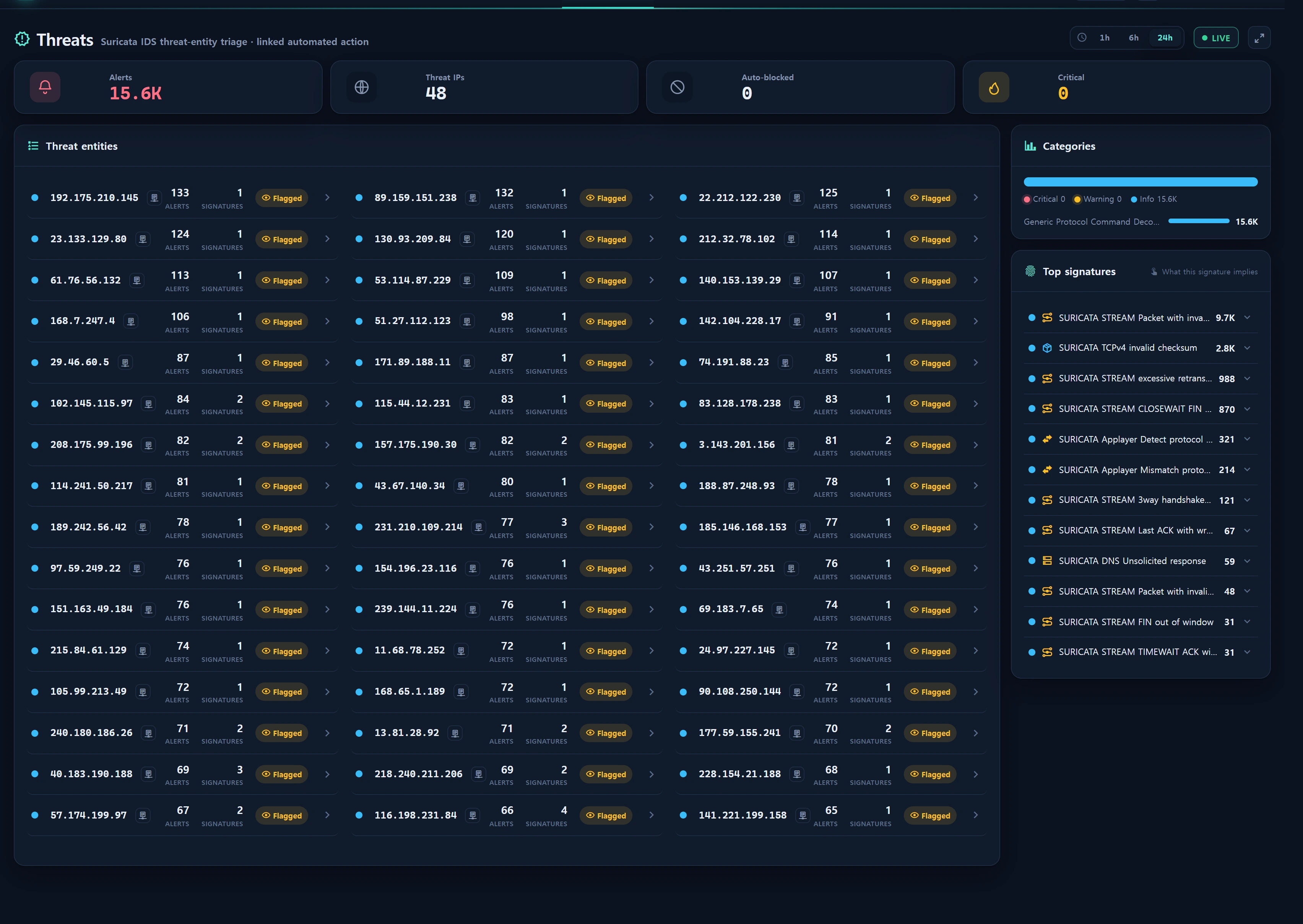
Overview — what it does
Security ▸ Threats (/security/threats) reshapes the Suricata IDS alert table suricata_alert_ct into a source-IP (src_ip) entity view for triage. Instead of listing thousands of raw alerts, it groups them into "who (which IP) hit us, how hard, and how" and ranks by severity.
It ties three things together on one screen:
- Threat-entity triage — a card per src_ip summarizing alert count, top severity, distinct signatures, and last-seen time.
- Auto-action (block) linkage — each threat IP's /24 is matched against the auto-defense table
blacklist_infoto attach a Blocked / Detected badge, so detection and response read as one story. - Signature Lore — most Suricata signature strings are hard-to-read engine events (stream / decoder / app-layer events), not content rules. This page narrates what each signature actually implies (what it detected · why it fired [benign→malicious] · what to watch for · worst case) in an explanation panel.
Everything is read-only. The only state-changing action is a deep link that sends a threat IP to the Blocklist; the actual block write happens there under a separate permission.
When to use
- Morning triage: skim the IPs that hit you most in the last 24h and their severity.
- Deciding whether a specific IP is a real threat or noise — classify fast via the lore's [benign/watch/malicious] tone and the auto-block badge.
- Explaining "what does this signature even mean?" to a teammate — the lore panel doubles as a teaching aid.
- After investigating a threat IP, promoting it to a block candidate (→ Blocklist deep link, → IP Reputation popup).
Layout
Top KPIs (window-scoped)
| KPI | Meaning | Derivation |
|---|---|---|
| alerts | Total IDS alerts in the window | suricata_alert_ct where alert_ts >= since count |
| entities | Threat-IP entity count | Top src_ips (up to 48) |
| blocked | Threat IPs already auto-blocked | entity /24 ∈ blacklist_info(is_use=1) |
| critical | Unmitigated critical threat IPs (all observed = critical_all) |
max_sev <= 1 and not blocked yet |
Threat-entity cards/rows
Shows up to 48 top src_ips ordered by alert count (desc). Each entity carries:
| Field | Description |
|---|---|
ip |
source IP (src_ip) |
alerts |
this IP's alert count in the window |
sev |
top severity (1=critical … 3=info). Suricata: lower is more severe → MIN(severity) is the top |
sigs |
distinct signatures (sid) — attack variety |
last_ts |
last observed time |
blocked |
true if this IP's /24 is on the auto-block list |
block_source |
block source tag: kitsune · suricata · manual · other (parsed from the reason string) |
country / asn |
geo/ASN enrichment (ip_info_loop, latest row) |
Your own network is excluded.
SecurityScope::excludePrefixes()filters out the /24 of registered instance IPs (plus the internal-network whitelist from Operations Policy) withNOT LIKE, so your own servers appearing as a source do not clutter the threat list. If an internal IP still shows up because of the direction label, aninternalbadge (driven byinternalMatchers) is attached and the reputation button is hidden.
severity distribution · categories · signatures
- severity distribution:
{1: n, 2: n, 3: n}— critical/warn/info alert counts. - categories: top 10 categories (count desc) with each minimum severity.
- signatures: top 12 signatures (count desc). Each item carries
signature·sid·cnt·sev(min) +explain(the SignatureLore classification). Clicking a signature opens the sibling lore panel.
Signature Lore panel
App\Support\SignatureLore::classify() classifies the signature string into a family and a detail key; the actual prose lives in the resources/lang/{ko,en}/siglore.php language pack. The frontend merges family + key (the detail overrides the family) into a four-part narrative.
| Part | Content |
|---|---|
| What it detected (meaning) | what the signature caught, protocol-wise |
| Why it fired · possibilities (why) | candidate causes listed [benign] → [watch] → [malicious] by tone |
| What to watch for (caution) | how to separate noise from a real signal |
| Worst case (worst) | the breach it can lead to if ignored |
Each family carries an implied severity (tone) — even informational events differ in what they imply.
| family | Label | tone | Icon |
|---|---|---|---|
stream |
TCP stream reassembly anomaly | warn | mdi-transit-connection-variant |
decoder |
Packet decode/integrity anomaly | info | mdi-package-variant-closed |
applayer |
Application-protocol anomaly | warn | mdi-swap-horizontal-bold |
http |
HTTP parsing anomaly | warn | mdi-web |
tls |
TLS anomaly | warn | mdi-lock-outline |
dns |
DNS anomaly | warn | mdi-dns-outline |
scan |
Scan/recon | warn | mdi-radar |
exploit |
Exploit attempt | crit | mdi-bug-outline |
malware |
Malware/C2 | crit | mdi-virus-outline |
dos |
DoS/flooding | crit | mdi-flash-alert-outline |
policy |
Policy/info | info | mdi-file-document-outline |
generic |
Other IDS signature | info | mdi-shield-alert-outline |
There are 14 detail-key overrides: invalid_timestamp · checksum · retransmit · handshake · evasion · stateanomaly · host_header · desync · malformed · one_direction · mismatch · starttls · tls_anomaly · unsolicited.
Most stream/decoder signatures (e.g.
SURICATA STREAM Packet with invalid timestamp,SURICATA TCPv4 invalid checksum) are sev3 informational and fire in bulk from infrastructure traits like asymmetric routing and NIC checksum offloading — benign noise. Look less at the signature itself and more at whether the same src_ip stacks multiple families in a short window (scan + handshake anomaly, etc.). That stacking is the signal of intent.
How to use
1) Pick the range
Default window is 24h. Supported ranges:
| range | window (min) |
|---|---|
1h |
60 |
6h |
360 |
24h |
1440 (default) |
The toggle is passed as ?range=; any value not in the whitelist is downgraded to 24h.
2) Triage threat IPs
- Start from entities with the highest severity (
sev=1critical) and alert count. - A Blocked badge means auto-defense already responded — check
block_sourceto see which engine blocked it. - Not blocked + high severity + many signatures is your top investigate/block candidate.
3) IP drilldown (security-specific popover)
Clicking an IP calls GET /security/threats/ip-detail?ip=<IP>&range=<range>. The IP is strictly validated with FILTER_VALIDATE_IP; an invalid value returns 422 (invalid_ip). Returned fields:
{
  "ok": true,
  "detail": {
    "ip": "203.0.113.10",
    "cidr": "203.0.113.0/24",
    "geo": { "country": "US", "city": null, "asn": "ASNNNNN", "isp": "...", "org": "..." },
    "signatures": [
      { "signature": "...", "severity": 3, "cnt": 42, "explain": { "family": "stream", "key": "invalid_timestamp", "tone": "warn", "icon": "mdi-...", "svg": "stream" } }
    ],
    "blocked": true,
    "block_source": "suricata",
    "block_reason": "[Suricata Auto-Block] ...",
    "block_at": "2026-08-13 04:12:00",
    "abuse_url": "https://www.abuseipdb.com/check/203.0.113.10"
  }
}
- geo/ASN:
ip_info_loopenrichment. - signatures: this IP's top 8 signatures (count desc) each with its
explainlore. - block status: /24 match against
blacklist_info(c_class,is_use=1) → source tag · raw reason · block time.
4) Check reputation · promote to block
- Click the symbol (
.infr-ipsym) next to an IP → IP Reputation AbuseIPDB in-app popup (mixins/abuse_check.js+/security/ip-reputation). It shows abuse confidence, report count, country, usage type, and recent report details. - After investigating, decide to block → deep link to the Blocklist with
?add=<IP>(normalized to /24 on insert, under a separate permission with audit).
Data sources
| Table | Purpose | Access |
|---|---|---|
suricata_alert_ct |
IDS alerts (src_ip · severity · category · signature · sid · alert_ts) | read |
blacklist_info |
auto-block list (/24 c_class · reason · country · is_use) |
read (auto-action badge) |
ip_info_loop |
geo/ASN/ISP enrichment | read |
| registered instance IPs + Operations Policy internal nets | self-network exclusion · internal badge | SecurityScope |
All sources live on the
legacy_gloryconnection (unprefixed legacy tables filled by the collector fleet) and are read-only. The read backbone isApp\Repositories\SecurityRepository(parameter binding · narrow windows · LIMIT). The controller/service never create or alter these tables.
Cache · refresh
ThreatService::build()results are cached 30 seconds per range (keyinfr:sec:th:<range>).- The screen refreshes by 30-second polling (
/security/threats/live) — not Reverb. - Because top severity uses
MIN(severity), a lowersevis more dangerous (1=critical, 3=info).
Access
| Action | Level |
|---|---|
| View screen · drilldown · reputation | ≥ 2 (staff=5, admin=10) |
| Demo (1) access | denied |
- The entire
/security/*prefix is protected by theinfr.level:2middleware. Demo (1) is restricted from security data (RBAC levels). - Threats itself is all GET (read-only), so it is not an audit-write target. Destructive/external actions such as block writes or abuse reporting are performed under their own permission and audit in the Blocklist and international-collaboration flows respectively.
Troubleshooting & FAQ
Q. invalid timestamp / invalid checksum dominate — is that an attack?
Usually not. invalid checksum fires in bulk on your own server traffic due to NIC checksum offloading; invalid timestamp fires from asymmetric routing and middleboxes. Both are sev3 benign noise — the lore's [benign] entries explain exactly this. Only suspect them when they concentrate on a specific external src_ip that also stacks other signals (scan · handshake anomaly).
Q. Why is severity 1 the most critical?
By Suricata convention severity 1=high, 2=medium, 3=informational. So an entity's top risk is computed with MIN(severity).
Q. My own server IP appears in the threat list.
SecurityScope excludes registered-instance /24s and the internal whitelist, but an unregistered IP or a direction (src/dst) label can still surface. Register the IP under Instances or add the range under Operations Policy. If it still shows, an internal badge is attached.
Q. The IP drilldown returns 422.
The ip parameter is not a valid IP (invalid_ip). Confirm it is a real IPv4/IPv6 value.
Q. The lore only shows "Other IDS signature".
Signatures that no SignatureLore::match() keyword rule catches fall back to the generic family. Judge by the category and signature name, and if needed add a detail key to siglore.php.
Q. The list is unchanged for 30 seconds. Expected. The service uses a per-range 30-second cache plus 30-second polling. If you need the freshest value immediately, reload after the cache expires (forces recompute).
Related
- Security Overview — the threat→detection→response defense funnel (centerpiece)
- Detections & JA3 — Kitsune ML · srct heuristics · JA3 sequence anomaly
- Rulesets — the 44-ruleset canonical detection catalog
- Blocklist & Reputation — view/add/release auto-blocks (
blacklist_info) - IP Reputation — AbuseIPDB in-app reputation popup
- Whitelist — block-exemption IPs/CIDRs